Most marketers I train are running three or four browser tabs of AI tools before they’ve even opened their actual campaign dashboard. Some of those tabs earn their place. Most don’t.
That gap is exactly why “AI tools for digital marketing” is one of the most searched phrases among students and working professionals right now. Everyone wants a shortlist that actually works instead of a 50-tool roundup that reads like a spec sheet.
I teach digital marketing and SEO at Appwars Technologies in Noida, and this list is built from tools I use with students on live projects, client audits, and ad accounts. No affiliate rankings. Just what earns a spot on a working marketer’s desktop.
By the end, you’ll know which of these AI tools for digital marketer roles are worth paying for, which free AI tools for digital marketing actually hold up, and where each one fits into a real week of work.
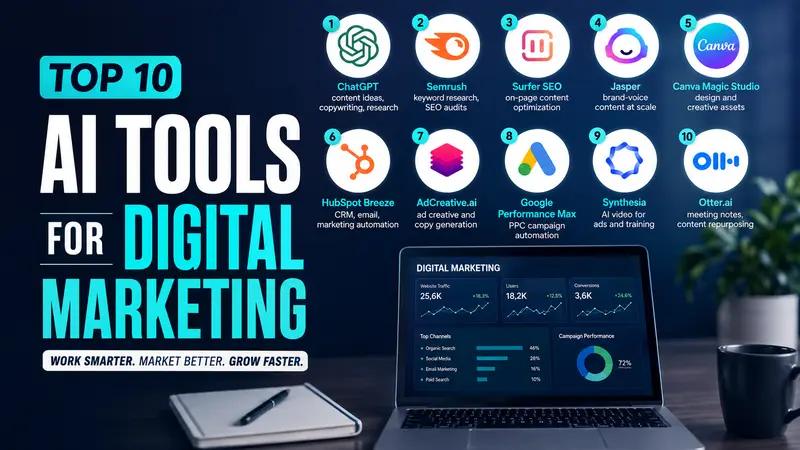
The 10 tools at a glance
| Tool | Best for | Free plan | Starting price |
|---|---|---|---|
| ChatGPT | Content ideas, copywriting, research | Yes. | $20/month for Plus |
| Semrush | Keyword research, SEO audits | Free trial only | Around $140/month |
| Surfer SEO | On-page content optimization | No | Around $49/month (annual) |
| Jasper | Brand-voice content at scale | 7-day trial | $69/month |
| Canva Magic Studio | Design and creative assets | Yes. | Around $13/month for Pro |
| HubSpot Breeze | CRM, email, marketing automation | Yes (free CRM) | From $15/seat/month |
| AdCreative.ai | Ad creative and copy generation | Free trial only | Under $50/month |
| Google Performance Max | PPC campaign automation | Free to set up | Pay per click, no flat fee |
| Synthesia | AI video for ads and training | Free trial only | Around $29/month |
| Otter.ai | Meeting notes, content repurposing | Yes. | $16.99/month for Pro |
Prices shift often. Check the vendor’s site before you commit a budget line to any of these.
1. ChatGPT
ChatGPT is still the first stop for most marketers, and for good reason. It drafts blog outlines, rewrites ad copy in five tones in under a minute, and works as a research assistant when you’re stuck on a brief.
I have students use it to generate 20 headline variations before a campaign, then pick 3 to A/B test. That’s a 10-minute task instead of an hour.
Where it falls short: it doesn’t know your live rankings, your ad account data, or your actual customers. Treat it as a drafting partner, not a source of ground truth.
- Best for: first drafts, brainstorming, quick research summaries
- Watch out for generic phrasing if you don’t feed it your brand voice and real examples
Get Free Career Counseling ➔
2. Semrush
Semrush built AI features into its existing keyword research, site audit, and competitor tracking tools. That combination matters more than any single AI feature.
Its keyword magic tool now clusters keywords by search intent automatically, which used to take an analyst an afternoon. The SEO Writing Assistant scores drafts against top-ranking pages while you write, not after you publish.
For students learning SEO, Semrush is where theory turns into a habit: you see keyword difficulty, search volume, and content gaps on the same screen instead of guessing.
- Best for: keyword research, technical audits, competitor gap analysis
- Watch out for the price. It’s built for agencies and in-house teams, not solo learners on a tight budget
3. Surfer SEO
Surfer does one thing and does it well: it tells you what a page needs to compete for a specific keyword, based on what’s already ranking.
You paste in a target keyword, and it hands back word count targets, header suggestions, and related terms pulled straight from the top 10 results. Writers who used to guess at content length now have a number to hit.
I’ve watched students take a 40-score draft in Surfer, add the missing subtopics it flagged, and jump into the 80s within one edit pass. That’s not magic. It’s a checklist made visible.
- Best for: on-page optimization for a specific piece of content
- Watch out for: it works from what already ranks, so it won’t help you find a genuinely new angle
4. Jasper
Jasper is built for teams that need content at volume without losing brand voice across ten writers.
You train it on your brand guidelines once, and it holds that tone across blog posts, ad copy, email sequences, and product descriptions. Agencies managing several client accounts use it to stop content from drifting between “playful startup” and “corporate memo” depending on who’s writing that day.
For a solo marketer or a student, Jasper is probably overkill. For a content team producing daily output across channels, it earns its subscription fast.
- Best for: brand-consistent content across a team
- Watch out for: no free tier, and the learning curve for brand voice setup takes a few hours
5. Canva Magic Studio
Canva’s AI layer, Magic Studio, turns a text prompt into a draft social post, resize a design across 10 platforms in one click, and removes a background without opening Photoshop.
For marketers who aren’t trained designers (most of us), this closes a real gap. You can go from a campaign brief to a set of Instagram, LinkedIn, and email banner assets in one sitting.
It’s not a replacement for a real designer on brand campaigns. It’s a replacement for the hours you used to lose formatting the same graphic five different ways.
- Best for: social creatives, quick banners, resizing assets across platforms
- Watch out for: it leans generic if you don’t upload your own brand kit and fonts first
6. HubSpot Breeze
Breeze is HubSpot’s AI layer sitting on top of its CRM, email, and automation tools. It writes subject lines, scores leads based on behavior, and summarizes long email threads into a two-line brief.
The real value shows up when your marketing and sales data already live in HubSpot. Breeze reads that history and personalizes follow-ups without a marketer manually segmenting every list.
If you’re not already on HubSpot, the AI features alone aren’t a strong enough reason to switch. If you are, Breeze is worth turning on.
- Best for: teams already running HubSpot for CRM and email
- Watch out for: onboarding and contact-tier pricing add up fast once you’re past the free tier
7. AdCreative.ai
AdCreative.ai generates ad creative and copy variations from a product photo and a few brand details. It scores each variation for predicted performance before you spend a rupee testing it live.
For performance marketers running Meta and Google campaigns, this cuts down the design bottleneck that usually slows down testing. Instead of waiting three days for five ad creatives, you get 50 variations in minutes and pick your top performers.
The scoring isn’t a guarantee. It’s a prioritization tool, so you still need to run real tests before scaling spend.
- Best for: generating and pre-screening ad creative at speed
- Watch out for: predicted scores aren’t a substitute for actual campaign data
Get Free Demo Class ➔
8. Google Performance Max
Performance Max runs inside Google Ads and uses machine learning to place your ads across Search, Display, YouTube, Gmail, and Maps from one campaign.
You feed it your goals, budget, and creative assets, and it handles bidding and placement decisions in real time. For students learning paid media, it’s a shift from manually setting bids to managing inputs and reading output reports.
The trade-off is visibility. You get less control over exactly where each ad shows, which makes clean tracking and clear creative assets more important, not less.
- Best for: automating bidding and placement across Google’s full ad network
- Watch out for: limited campaign-level visibility means you need strong measurement set up before you launch
9. Synthesia
Synthesia turns a script into a video with an AI presenter, in over 140 languages, without a camera or a studio.
Training teams use it to update onboarding videos without re-hiring a presenter every time a process changes. Marketing teams use it for quick explainer videos and localized ad content for different markets.
It won’t replace a real spokesperson for a high-stakes brand campaign. For internal training, product walkthroughs, and repeatable video content, it removes a real production bottleneck.
- Best for: training videos, explainer content, and localization at scale
- Watch out for: AI presenters still read as AI presenters on close inspection, so match the use case to the tolerance for that
10. Otter.ai
Otter.ai transcribes meetings and client calls in real time, then summarizes them into action items automatically.
Marketers use it two ways: as a note-taker so everyone in the meeting can stay present instead of typing, and as a content source. A 30-minute client call has quotes, pain points, and language you can turn into ad copy or a case study without paraphrasing from memory.
- Best for: meeting notes, content repurposing from calls and interviews
- Watch out for: accuracy drops with heavy accents or overlapping speakers, so review the transcript before you quote it anywhere
Explore Trending Courses ➔
Free AI tools for digital marketing worth starting with
If you’re a student or just starting out, you don’t need a card on file to begin. These have functional free tiers:
- ChatGPT free tier for drafting and research
- Canva free plan for design and basic Magic Studio features
- HubSpot free CRM with limited Breeze features
- Otter.ai free plan covers a set number of transcription minutes a month
- Google’s own tools (Trends, Search Console, Analytics) aren’t branded “AI tools,” but their AI-driven insights and Performance Max entry point cost nothing to set up
Start here, get comfortable, and upgrade only when a free tier’s limit is actually slowing you down. Most students never hit that ceiling in their first year.
How to pick the right tool for your situation
Don’t collect tools. Pick based on what’s actually eating your time.
- If content drafting takes too long, start with ChatGPT or Jasper, not both
- If you’re guessing at keywords, Semrush or a free alternative like Google Keyword Planner comes first
- If your writing ranks but doesn’t fully cover the topic, add Surfer SEO
- If design is your bottleneck, Canva Magic Studio solves it in a week, not a quarter
- If you’re managing paid ads solo, Google Performance Max and AdCreative.ai together cover creative and placement
Pick one gap, fix it with one tool, then move to the next. Running five subscriptions you use twice a month isn’t a strategy.
Frequently asked questions
What are the best AI tools for digital marketing in 2026?
For most marketers, ChatGPT, Semrush, Canva Magic Studio, and Google Performance Max cover the bulk of daily work: content, research, design, and paid ads. Add Surfer SEO or Jasper once your content volume grows past what one writer can handle alone.
Are there genuinely free AI tools for digital marketing?
Yes. ChatGPT, Canva, HubSpot’s free CRM tier, and Otter.ai all have usable free plans. They come with limits on volume or features, but they’re real starting points, not 3-day trials disguised as free plans.
Do I need to know how to code to use these tools?
No. Every tool on this list is built for marketers, not developers. The learning curve is closer to a new dashboard than a new programming language.
Will AI tools replace digital marketing jobs?
They’re changing what the job looks like more than they’re removing it. Someone still has to set the strategy, judge whether an AI-generated headline actually fits the brand, and decide which of 50 ad variations is worth real budget. That judgment is the part these tools can’t do for you.
Where this fits if you’re learning digital marketing
Tools change every few months. What doesn’t change is the strategy underneath them: knowing which keyword actually has buyer intent, which ad creative deserves budget, and which content gap is worth filling first.
That’s the part we cover in depth in our Digital Marketing certification in Noida, where AI tools sit inside a full curriculum instead of standing in for one. If SEO specifically is your goal, our SEO course goes deep into the keyword research and content optimization work that tools like Semrush and Surfer only speed up, not replace.
And if paid social is where you want to specialize, our Meta Ads Course module covers campaign structure and audience targeting before you ever hand creative decisions to an AI scoring tool.
Learn the fundamentals first. The tools are easier to use well once you know what “good” actually looks like.