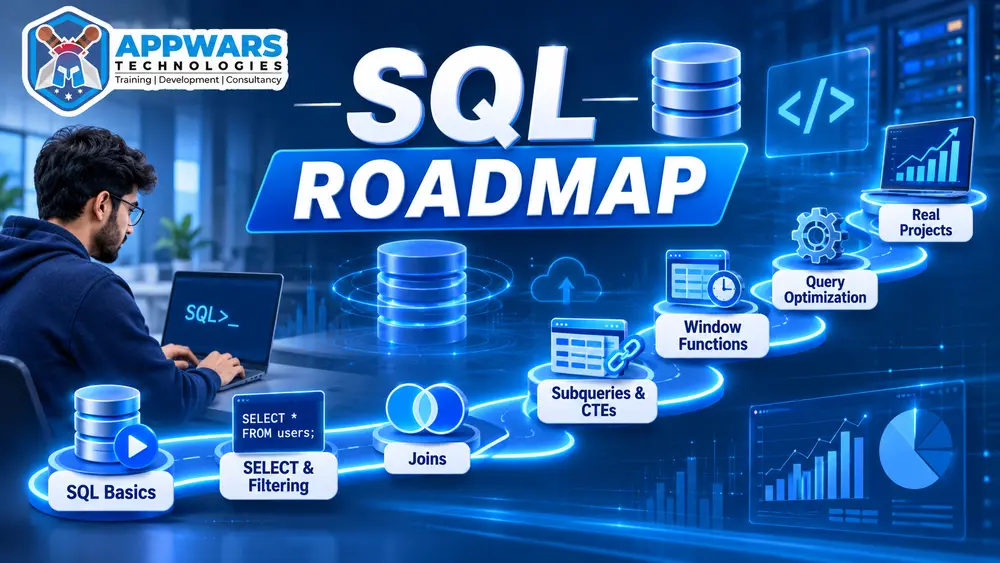
SQL is still one of the first skills employers ask for. Analysts write it every day, data scientists use it to pull training data, and backend developers rely on it for the queries behind their apps. A good SQL roadmap tells you what to learn and in what order, so you stop jumping between random tutorials.
This SQL roadmap for 2026 breaks the path into four stages. For each stage, you’ll see what to learn, what to practice, and how to tell you’re ready to move on. It works for college students, career switchers, and working professionals who want data skills alongside their current job.
Why SQL still matters in 2026
Most business data sits in relational databases. Dashboards, reports, and machine learning pipelines all start with a SQL query somewhere in the chain. The tools around SQL change every year, but the core language has stayed stable for decades, so the time you invest keeps paying off.
Here is how different roles use SQL:
| Role | How they use SQL | Depth needed |
|---|---|---|
| Data analyst | Reports, dashboards, ad hoc business questions | Intermediate |
| Data scientist | Extracting training data, feature engineering | Intermediate to advanced |
| Backend developer | Schema design and app-level queries | Intermediate |
| BI developer | Data models, ETL logic, semantic layers | Advanced |
| Digital marketer | Exporting campaign and analytics data | Basic to intermediate |
If you’re unsure which role fits you, start with the foundations below. Every path in this SQL roadmap begins there.
Who should follow this SQL roadmap?
- Students who want a skill that strengthens a resume before placements.
- Career switchers moving from non-tech jobs into analytics or data roles.
- Working professionals who handle spreadsheets and want to query data directly.
- Developers who already code but need stronger database skills.
You don’t need a programming background to start. You do need consistent practice, about 1 to 2 hours on most days.
Stage 1: Foundations (weeks 1 to 4)
This stage teaches you how databases are organized and how to read data with confidence.
Core concepts to learn:
- Databases, tables, rows, and columns
- Primary keys and foreign keys
- SELECT, FROM, WHERE, ORDER BY, and LIMIT
- Filtering with AND, OR, IN, BETWEEN, LIKE, and IS NULL
- Aggregate functions: COUNT, SUM, AVG, MIN, and MAX
- GROUP BY and HAVING
- INNER JOIN and LEFT JOIN
Here is a query you should be able to read by the end of this stage:
sql
SELECT city, COUNT(*) AS total_customers
FROM customers
WHERE signup_year = 2026
GROUP BY city
HAVING COUNT(*) > 50
ORDER BY total_customers DESC;
Practice goal: Write 50 queries against one sample database, such as a retail or school dataset. Explain each query out loud before you run it.
You’re ready for Stage 2 when: you can write a join across two tables without checking notes.
Stage 2: Intermediate skills (weeks 5 to 10)
This is where SQL starts to feel useful for real business questions.
- RIGHT JOIN, FULL JOIN, SELF JOIN, and CROSS JOIN
- Subqueries and Common Table Expressions (CTEs) using WITH
- CASE statements for conditional logic
- Date and string functions for cleaning messy data
- Set operations: UNION, INTERSECT, and EXCEPT
- Window functions: ROW_NUMBER, RANK, DENSE_RANK, LAG, LEAD, and running totals
Window functions deserve extra time. They appear in almost every SQL interview and in most analyst tasks involving trends.
| Concept | Why it matters | Practice task |
|---|---|---|
| CTEs | Break long queries into readable steps | Rewrite three nested subqueries as CTEs |
| Window functions | Rankings and running totals without collapsing rows | Rank sales reps by monthly revenue |
| LAG and LEAD | Compare each row with the previous or next row | Calculate month-over-month growth |
| CASE | Build categories such as “high value” or “churn risk” | Bucket customers by purchase frequency |
| Date functions | Group and filter by week, month, or quarter | Build a monthly signup trend |
You’re ready for Stage 3 when: you can solve a problem that needs a window function and a CTE in the same query.
Stage 3: Advanced SQL (weeks 11 to 16)
Advanced SQL covers performance, design, and reliability. This stage separates people who write queries from people who build systems.
- Indexes: how they speed up reads and slow down writes
- EXPLAIN plans: reading how the database executes your query
- Normalization: organizing tables to reduce duplicate data (1NF, 2NF, 3NF)
- Views and stored procedures: reusable logic stored in the database
- Transactions: COMMIT, ROLLBACK, and ACID properties
- Recursive CTEs: querying hierarchical data such as org charts or category trees
- NULL handling: how NULL affects comparisons, aggregates, and joins
Performance tuning is the skill most learners skip, and it’s the one interviewers test most often. Take a slow query from your practice set, run EXPLAIN, add an index where it helps, and measure the difference.
You’re ready for Stage 4 when: you can design a three-table schema for a real scenario and explain why you chose each key.
Stage 4: Tools, projects, and job readiness (weeks 17 to 20)
SQL is portable, but each database has its own dialect and strengths. Pick one to focus on and learn it well.
| Database | Best for | Notes |
|---|---|---|
| MySQL | Web apps and beginners | Very common in startups |
| PostgreSQL | Analytics and advanced features | Strong standards compliance |
| SQL Server | Microsoft-heavy enterprises | Uses the T-SQL dialect |
| Oracle | Large banks and telecom | Uses PL/SQL for procedural code |
| SQLite | Practice and small apps | Needs no separate server |
If you’re aiming for analytics jobs, PostgreSQL or MySQL is a safe choice. Enterprise roles in Microsoft environments often expect SQL Server.
Connect SQL to the tools employers use.
- Power BI or Tableau: connect to your database and build a dashboard on top of your queries.
- Python: use pandas and SQLAlchemy to move data between SQL and notebooks.
- Excel: practice pivot-style summaries in SQL first, then compare the results.
Build a portfolio with five projects
- Sales performance pack: monthly revenue, top products, and regional trends.
- Customer churn analysis: cohort retention using window functions.
- E-commerce funnel: conversion rates at each step from visit to purchase.
- HR attrition report: turnover by department, tenure, and salary band.
- Library database: a normalized schema with primary keys, foreign keys, and sample data.
Store each project in a GitHub repository. Include the SQL files, a short README explaining the business question, and a screenshot of the output.
Common mistakes in an SQL roadmap
- Memorizing syntax without practicing on real data.
- Skipping joins and window functions because they feel hard. Interviews test them heavily.
- Learning three databases at once. Pick one and go deep.
- Writing long queries without naming CTEs. Readable code gets reviewed faster.
- Ignoring NULL behavior. Many wrong answers in analyst work come from NULL values.
- Waiting until you feel ready to build a project. A project of any size teaches more than another tutorial.
How long does this SQL roadmap take?
The timeline depends on how many hours you can give each week. These estimates are rough and assume consistent practice.
| Learner type | Weekly study time | Time to finish all four stages |
|---|---|---|
| Student with flexible schedule | 12 to 15 hours | About 4 to 5 months |
| Working professional | 6 to 8 hours | About 6 to 8 months |
| Weekend learner | 3 to 4 hours | About 9 to 12 months |
Consistency matters more than intensity. Four short sessions per week beat one long session on Sunday.
SQL interview topics to revise
Revise these topics in the last two weeks before any interview:
- Difference between WHERE and HAVING
- INNER JOIN versus LEFT JOIN, with an example of each
- How ROW_NUMBER, RANK, and DENSE_RANK differ when ties exist
- Finding duplicate records and deleting them safely
- Second-highest salary without using LIMIT on a subquery
- Explaining an index and when it hurts performance
- Writing a query that returns customers who never placed an order
Practice each question on paper before you type it. Interviewers often ask you to explain your logic, not just produce a result.
Frequently asked questions about the SQL roadmap
Do I need coding experience before starting?
No. SQL reads close to plain English, so beginners with no programming background can start with Stage 1. Basic comfort with spreadsheets helps.
Which should I learn first, SQL or Python?
Learn SQL first for most analytics roles. You’ll write queries daily, and Python becomes easier once you understand how data is structured.
Is an SQL certificate worth it?
A certificate helps less than a portfolio. Employers want to see queries that solve a business problem. Use a certificate as proof of study, not as the main evidence of skill.
How do I know I’m job-ready?
You can build a five-project portfolio, solve medium-level SQL problems in under 15 minutes, and explain your query choices to someone without a technical background.
Your next steps
- Pick one database and install it on your computer today.
- Finish the Stage 1 practice set within two weeks.
- Start a GitHub repository and upload your first query file.
- Set a weekly calendar block for practice and keep it.
If you want structured guidance, Appwars Technologies runs data training programs in Noida that follow a similar progression from SQL basics to analytics projects. You can explore the options on the Appwars Technologies.