appwars Technologies logo

Graphic Design Training in Noida Learn Creative Design Skills with Experts

Kickstart your creative journey with the best Graphic Design Training in Noida at Appwars Technologies. Our industry-oriented course is designed to teach you essential design tools like Adobe Photoshop, Illustrator, InDesign, CorelDRAW, and more. Learn how to create stunning visuals, logos, brochures, social media posts, and branding materials with hands-on projects and expert guidance. Whether you’re a beginner or want to upgrade your skills, our graphic design training will help you build a strong portfolio and prepare you for exciting career opportunities. Enroll now and become a professional graphic designer with certification and placement support in Noida.

Certification Partners

oficail logo

Our Students Placed In These Companies

Graphic Desiging with Al Course Content

  • History of Graphic Design
  • Future of Graphic Design
  • Equipments:
  1. Computer
  2. Scanner
  3. Camera
  4. DigitaI tablet
  5. printer
  • Color
  • Line
  • Shape
  • Form
  • Texture
  • Balance
  • Contrast
  • Emphasis/Dominance
  • Harmony
  • Movement/Rhythm
  • Proportion
  • Repetition/Pattern
  • Unity
  • Variety
  • Adobe Photoshop - Image Editing & Manipulation
  • Adobe Illustrator - Vector Design & Logo Creation
  • Adobe InDesign - Layout Design for Print & Digital Media
  • Corel Draw - vector illustration, page layout, photo editing, and typography
  • Getting to Know the Work Area 
  • The Photoshop Environment 
  • Creating Custom Workspaces 
  • Image Magnification
  • Undoing Mistakes and the History Palette
  • Using the options bar and other panels
  • Using the Tools
  • Displaying Drawing Guides
  • Setting Preferences
  • Photoshop Image Manipulation
  • Basic image editing & Cropping an Image
  • Bitmap & Vector Images
  • Image Size and Resolution Settings
  • Scanning Images & Placing Files
  • Supported import and export formats 
  • Color Basics, Modes & Models 
  • Color Management
  • Using the Color Picker 
  • Selecting colors with the Eyedropper Tool
  • Selecting colors with the Swatches Palette
  • Photoshop Tools
  • Parts of the Toolbox
  • Toolbox shortcuts
  • Tool Options 
  • Marquees, Magic want & Lassos Tool
  • Move, Crop & Slice Tool
  • Healing Brush Tool
  • Pattern Stamp & Clone Stamp Tool
  • Patch, Pencil & Paintbrush Tool
  • Color Replacement Tool
  • Eraser & History Brushes Tool
  • Gradient & Paint Bucket Tool
  • Burn-dodge-sponge Tool
  • Blur-sharpen-smudge Tool
  • Shapes-line-rectangle-polygon Tool
  • Path selection Tool
  • Pen & Type Tool
  • Transforms, Using free transform
  • Move, Rotate & Scale
  • Skew Distort & Perspective
  • Invert, Flip-vertical & horizontal
  • Rotate 180, 90ocw, 90occw
  • Layer Basics
  • About Layers-fill and adjustment Layers
  • Using the Layers Palette
  • Creating, Deleting & Moving Layers
  • Layer Opacity & Locking Layers
  • Layer modes and blending options
  • Apply Layers Style
  • Flatting and saving file
  • Working with selections 
  • Using the quick selection tool 
  • Moving a selected area
  • Manipulating selection
  • Refining the edges of a selection
  • Masks and channels
  • Editing a mask
  • Filter effect to a masked selection
  • Actions & Using the action palette
  • Loading a saved action
  • Text editing and special effects
  • About the type Layer
  • Creating horizontal and vertical type
  • Horizontal and vertical type mask tools
  • Using character palette for text editing
  • Creating text warp & Rasterizing type
  • Converting type to Shapes
  • Adding effect to text
  • Photoshop Special effects and Filters 
  • Using filters 
  • Filter Combinations 
  • Creating Links within an image 
  • Slicing and image in Photoshop 
  • Getting to Know the work Area 
  • Overview 
  • Working with Panels 
  • Working with the tools panel
  • Understanding Rulers
  • Finding Resources 
  • Selection and Aligning
  • Selecting objects 
  • Alining Objects
  • Working with Groups
  • Arrange Objects
  • Distributing Objects
  • Creating and Editing Shapes
  • Working with basic shapes
  • Creating ellipses and polygons
  • Changing Stroke width and alignment Joining paths
  • Combining and editing shapes
  • Working with the pathfinder
  • Using Live Trace
  • Transforming Objects
  • Working with art boards
  • Scaling, reflecting, rotating, distorting and shearing objects
  • Working with rulers and guides
  • Changing Perspective
  • Using free distort
  • Transforming Content
  • Drawing
  • Editing a Path
  • Coloring and Painting
  • Color modes
  • Editing a Swatch
  • Using Patterns
  • Working with Live Paint
  • Using Gradients
  • Working with Type
  • Threading text
  • Changing
  • Using styles
  • Changing fonts size and color
  • Using styles 
  • Warping text 
  • Text on a path 
  • Wraping text around an object
  • Sampling text
  • Working with Layers
  • Creating Layers
  • Moving Objects and Layers
  • Merging Layers 
  • Working with Brushes
  • Using Calligraphic Brushes
  • Editing a brush
  • Using Art Brushes
  • Creating a pattern brush
  • Creating custom brushes
  • Using Effects, Appearance Attributes and Graphic Styles
  • Using and editing effects
  • Using appearance attributes
  • Creating and saving graphic styles
  • Introduction CorelDraw 
  • Starting with CorelDraw 

1. Understanding Corel Draw Tools

  • Pick Tools and Freehand Pick Tool 
  • Shape Tools 
  • Smudge Brush Tool and Roughen Brush Tool 
  • Free Transform Tool 
  • Smear Tool and Twirl tool 
  • Attract tool and Repel tool 
  • Crop Tool and Knife Tool 
  • Eraser Tool and Virtual Segment Delete Tool 
  • Zoom Tool And Pan Tool 
  • Freehand Tool 
  • Polyline Tool 
  • Smart Fill And Smart Drawing 
  • Pen Tool 
  • Ellipse, Polygon, Star, Complex Star, Graph Paper and Spiral Tool and shapes 
  • Text Tool (Artistic Text and Paragraph text) 
  • Blend Tool 
  • Drop Shadow Tool
  • Transparency Tool
  • Color Eyedropper tool
  • Outline Pen tool
  • Uniform Fill and Fountain Fill Tool
  • Texture Fill
  • Interactive Fill
  • Mash Fill 

2. Understanding CorelDraw Basic

  • Save File, Export To jpg, pdf and import image 
  • Object Position 
  • Align and Distribute Object 
  • Object order
  • Group, ungroup Object and Lock, unlock Object
  • Distributing object Same Space
  • Undo and Redo and Repeat Object
  • Insert page and insert page number
  • Fit text path
  • Weld Object
  • Trim Object
  • Intersect, Simplify, Front minus Back, Back Minus Front
  • Object
  • Power clip object

1. Basics of InDesign

  • Understanding the interface (tools, panels, workspace) 
  • Creating a new document (setting up page size, margins, columns, and bleeds) 
  • Navigating pages and spreads 

2. Working with Text

  • Adding and formatting text frames
  • Using character and paragraph styles for consistency
  • Managing text flow across multiple frames
  • Working with fonts, kerning, leading, and tracking

3. Working with Images & Graphics

  • Adding and formatting text frames
  • Using character and paragraph styles for consistency
  • Managing text flow across multiple frames
  • Working with fonts, kerning, leading, and tracking

4. Layout & Design Principles

  • Adding and formatting text frames 
  • Using character and paragraph styles for consistency 
  • Managing text flow across multiple frames 
  • Working with fonts, kerning, leading, and tracking 

5. Color and Effects

  • Understanding CMYK vs. RGB for print vs. digital
  • Using swatches and gradients
  • Applying drop shadows, transparency, and blending modes

6. Automation & Efficiency

  • Creating templates for repeated designs
  • Using scripts and plugins
  • Exporting for different formats (EPUB, PDF, interactive PDFs)

1. Getting Started with Canva

  • Understanding the interface (toolbar, templates, elements, and text tools) 
  • Choosing the right dimensions for your design 
  • Using pre-made templates vs. creating from scratch

2. Working with Text & Fonts

  • Adding and formatting text boxes 
  • Choosing the right fonts for branding
  • Using text effects (shadows, outlines, curved text)
  • Pairing fonts for better readability

3. Working with Images & Graphics

  • Uploading and using your own images
  • Using Canva's stock photos and elements
  • Removing backgrounds (Canva Pro feature)
  • Adding stickers, icons, and shapes

4. Layout & Design Principles

  • Using grids and alignment tools
  • Working with color schemes and brand colors
  • Adjusting transparency, layers, and grouping elements
  • Adding frames, borders, and shadows

5. Creating Presentations & Videos

  • Designing professional presentations
  • Using Canva's animation tools
  • Adding videos and GIFs
  • Exporting in MP4, GIF, or PDF

6. Branding & Marketing Tools

  • Creating a brand kit (logos, fonts, colors)
  • Designing social media posts, ads, and banners 
  • Making business cards, flyers, and brochures 
  • Using mockups for product designs

7. Collaboration & Exporting

  • Sharing and collaborating on team projects 
  • Exporting in different formats (PNG, JPG, PDF, MP4) 
  • Resizing designs for multiple platforms (Canva Pro feature) 
  • Adobe Photoshop with GEN Al 
  • Adobe illustrator with GEN AI
  • Corel Draw with GEN AI
  • Canva Al
  • Indesign with GEN Al
  • Chatgpt and Gemini
  • Building a Strong Portfolio
  • Finding Freelance Clients & Projects
  • Resume & Interview Preparation
  • History of Graphic Design
  • Future of Graphic Design
  • Equipments:
  1. Computer
  2. Scanner
  3. Camera
  4. DigitaI tablet
  5. printer
  • Color
  • Line
  • Shape
  • Form
  • Texture
  • Balance
  • Contrast
  • Emphasis/Dominance
  • Harmony
  • Movement/Rhythm
  • Proportion
  • Repetition/Pattern
  • Unity
  • Variety
  • Adobe Photoshop - Image Editing & Manipulation
  • Adobe Illustrator - Vector Design & Logo Creation
  • Adobe InDesign - Layout Design for Print & Digital Media
  • Corel Draw - vector illustration, page layout, photo editing, and typography
  • Getting to Know the Work Area 
  • The Photoshop Environment 
  • Creating Custom Workspaces 
  • Image Magnification
  • Undoing Mistakes and the History Palette
  • Using the options bar and other panels
  • Using the Tools
  • Displaying Drawing Guides
  • Setting Preferences
  • Photoshop Image Manipulation
  • Basic image editing & Cropping an Image
  • Bitmap & Vector Images
  • Image Size and Resolution Settings
  • Scanning Images & Placing Files
  • Supported import and export formats 
  • Color Basics, Modes & Models 
  • Color Management
  • Using the Color Picker 
  • Selecting colors with the Eyedropper Tool
  • Selecting colors with the Swatches Palette
  • Photoshop Tools
  • Parts of the Toolbox
  • Toolbox shortcuts
  • Tool Options 
  • Marquees, Magic want & Lassos Tool
  • Move, Crop & Slice Tool
  • Healing Brush Tool
  • Pattern Stamp & Clone Stamp Tool
  • Patch, Pencil & Paintbrush Tool
  • Color Replacement Tool
  • Eraser & History Brushes Tool
  • Gradient & Paint Bucket Tool
  • Burn-dodge-sponge Tool
  • Blur-sharpen-smudge Tool
  • Shapes-line-rectangle-polygon Tool
  • Path selection Tool
  • Pen & Type Tool
  • Transforms, Using free transform
  • Move, Rotate & Scale
  • Skew Distort & Perspective
  • Invert, Flip-vertical & horizontal
  • Rotate 180, 90ocw, 90occw
  • Layer Basics
  • About Layers-fill and adjustment Layers
  • Using the Layers Palette
  • Creating, Deleting & Moving Layers
  • Layer Opacity & Locking Layers
  • Layer modes and blending options
  • Apply Layers Style
  • Flatting and saving file
  • Working with selections 
  • Using the quick selection tool 
  • Moving a selected area
  • Manipulating selection
  • Refining the edges of a selection
  • Masks and channels
  • Editing a mask
  • Filter effect to a masked selection
  • Actions & Using the action palette
  • Loading a saved action
  • Text editing and special effects
  • About the type Layer
  • Creating horizontal and vertical type
  • Horizontal and vertical type mask tools
  • Using character palette for text editing
  • Creating text warp & Rasterizing type
  • Converting type to Shapes
  • Adding effect to text
  • Photoshop Special effects and Filters 
  • Using filters 
  • Filter Combinations 
  • Creating Links within an image 
  • Slicing and image in Photoshop 
  • Getting to Know the work Area 
  • Overview 
  • Working with Panels 
  • Working with the tools panel
  • Understanding Rulers
  • Finding Resources 
  • Selection and Aligning
  • Selecting objects 
  • Alining Objects
  • Working with Groups
  • Arrange Objects
  • Distributing Objects
  • Creating and Editing Shapes
  • Working with basic shapes
  • Creating ellipses and polygons
  • Changing Stroke width and alignment Joining paths
  • Combining and editing shapes
  • Working with the pathfinder
  • Using Live Trace
  • Transforming Objects
  • Working with art boards
  • Scaling, reflecting, rotating, distorting and shearing objects
  • Working with rulers and guides
  • Changing Perspective
  • Using free distort
  • Transforming Content
  • Drawing
  • Editing a Path
  • Coloring and Painting
  • Color modes
  • Editing a Swatch
  • Using Patterns
  • Working with Live Paint
  • Using Gradients
  • Working with Type
  • Threading text
  • Changing
  • Using styles
  • Changing fonts size and color
  • Using styles 
  • Warping text 
  • Text on a path 
  • Wraping text around an object
  • Sampling text
  • Working with Layers
  • Creating Layers
  • Moving Objects and Layers
  • Merging Layers 
  • Working with Brushes
  • Using Calligraphic Brushes
  • Editing a brush
  • Using Art Brushes
  • Creating a pattern brush
  • Creating custom brushes
  • Using Effects, Appearance Attributes and Graphic Styles
  • Using and editing effects
  • Using appearance attributes
  • Creating and saving graphic styles
  • Introduction CorelDraw 
  • Starting with CorelDraw 

1. Understanding Corel Draw Tools

  • Pick Tools and Freehand Pick Tool 
  • Shape Tools 
  • Smudge Brush Tool and Roughen Brush Tool 
  • Free Transform Tool 
  • Smear Tool and Twirl tool 
  • Attract tool and Repel tool 
  • Crop Tool and Knife Tool 
  • Eraser Tool and Virtual Segment Delete Tool 
  • Zoom Tool And Pan Tool 
  • Freehand Tool 
  • Polyline Tool 
  • Smart Fill And Smart Drawing 
  • Pen Tool 
  • Ellipse, Polygon, Star, Complex Star, Graph Paper and Spiral Tool and shapes 
  • Text Tool (Artistic Text and Paragraph text) 
  • Blend Tool 
  • Drop Shadow Tool
  • Transparency Tool
  • Color Eyedropper tool
  • Outline Pen tool
  • Uniform Fill and Fountain Fill Tool
  • Texture Fill
  • Interactive Fill
  • Mash Fill 

2. Understanding CorelDraw Basic

  • Save File, Export To jpg, pdf and import image 
  • Object Position 
  • Align and Distribute Object 
  • Object order
  • Group, ungroup Object and Lock, unlock Object
  • Distributing object Same Space
  • Undo and Redo and Repeat Object
  • Insert page and insert page number
  • Fit text path
  • Weld Object
  • Trim Object
  • Intersect, Simplify, Front minus Back, Back Minus Front
  • Object
  • Power clip object

1. Basics of InDesign

  • Understanding the interface (tools, panels, workspace) 
  • Creating a new document (setting up page size, margins, columns, and bleeds) 
  • Navigating pages and spreads 

2. Working with Text

  • Adding and formatting text frames
  • Using character and paragraph styles for consistency
  • Managing text flow across multiple frames
  • Working with fonts, kerning, leading, and tracking

3. Working with Images & Graphics

  • Adding and formatting text frames
  • Using character and paragraph styles for consistency
  • Managing text flow across multiple frames
  • Working with fonts, kerning, leading, and tracking

4. Layout & Design Principles

  • Adding and formatting text frames 
  • Using character and paragraph styles for consistency 
  • Managing text flow across multiple frames 
  • Working with fonts, kerning, leading, and tracking 

5. Color and Effects

  • Understanding CMYK vs. RGB for print vs. digital
  • Using swatches and gradients
  • Applying drop shadows, transparency, and blending modes

6. Automation & Efficiency

  • Creating templates for repeated designs
  • Using scripts and plugins
  • Exporting for different formats (EPUB, PDF, interactive PDFs)

1. Getting Started with Canva

  • Understanding the interface (toolbar, templates, elements, and text tools) 
  • Choosing the right dimensions for your design 
  • Using pre-made templates vs. creating from scratch

2. Working with Text & Fonts

  • Adding and formatting text boxes 
  • Choosing the right fonts for branding
  • Using text effects (shadows, outlines, curved text)
  • Pairing fonts for better readability

3. Working with Images & Graphics

  • Uploading and using your own images
  • Using Canva's stock photos and elements
  • Removing backgrounds (Canva Pro feature)
  • Adding stickers, icons, and shapes

4. Layout & Design Principles

  • Using grids and alignment tools
  • Working with color schemes and brand colors
  • Adjusting transparency, layers, and grouping elements
  • Adding frames, borders, and shadows

5. Creating Presentations & Videos

  • Designing professional presentations
  • Using Canva's animation tools
  • Adding videos and GIFs
  • Exporting in MP4, GIF, or PDF

6. Branding & Marketing Tools

  • Creating a brand kit (logos, fonts, colors)
  • Designing social media posts, ads, and banners 
  • Making business cards, flyers, and brochures 
  • Using mockups for product designs

7. Collaboration & Exporting

  • Sharing and collaborating on team projects 
  • Exporting in different formats (PNG, JPG, PDF, MP4) 
  • Resizing designs for multiple platforms (Canva Pro feature) 
  • Adobe Photoshop with GEN Al 
  • Adobe illustrator with GEN AI
  • Corel Draw with GEN AI
  • Canva Al
  • Indesign with GEN Al
  • Chatgpt and Gemini
  • Building a Strong Portfolio
  • Finding Freelance Clients & Projects
  • Resume & Interview Preparation

1. SOFTWARE & TOOLS MASTERY

  • Adobe Premiere Pro (PRIMARY)
  • VN Editor

2. Adobe Premiere Pro Basics

  • Introduction to Video Editing 
  • Understanding Video Formats & Resolution 
  • Premiere Pro Interface & Workspace
  • Importing & Organizing Media
  • Timeline & Sequence Settings
  • Basic Editing Tools (Cut, Trim, Razor, Ripple Edit)
  • Keyboard Shortcuts
  • Export Settings

3. Professional Video Editing

  • Advanced Timeline Editing 
  • Video Transitions 
  • Speed Control & Speed Ramping 
  • Keyframe Animation 
  • Text & Title Design
  • Lower Third
  • Motion Graphics Templates (MOGRT)
  • YouTube & Instagram Editing Workflow 

4. Color Grading & Audio Editing

  • Color Correction
  • Color Grading using Lumetri Color
  • LUTS & Cinematic Looks
  • Audio Editing
  • Noise Reduction
  • Background Music & Sound Effects
  • Voice Synchronization
  • Green Screen (Chroma Key)
  • Basic Masking

5. VN Editor Basics + Portfolio Projects

  • VN Interface Overview 
  • Mobile Video Editing Workflow 
  • Reel Editing 
  • Text Animation 
  • Trending Transitions 
  • Filters & Effects 
  • Export for Social Media
  • Final Projects: Instagram Reel, YouTube Video, Promotional
  • Advertisement, Product Promo Video, Corporate Video, Portfolio Video Creation
Enquiry Now

    Our Placed Students

    placed students

    Graphics Designing and Video Editing Tools

    indesign

    Indesign

    indesign

    Indesign

    photoshop

    Photoshop

    illustrator

    Illustrator

    coreldraw

    Corel Draw

    canva

    Canva

    premiere pro

    Premiere pro

    vn

    VN

    gemini

    Gemini

    google flow

    Flow AI

    chatgpt

    ChatGPT

    40+ Graphic Designing & Video Editing Skills

    • Graphic Design Fundamentals
    • Visual Design
    • Typography
    • Color Theory
    • Layout Design
    • Composition
    • Brand Identity Design
    • Logo Design
    • Print Design
    • Digital Design
    • Social Media Design
    • Poster Design
    • Banner Design
    • Brochure Design
    • UI Design
    • Photo Editing
    • Image Retouching
    • Adobe Photoshop
    • Adobe Illustrator
    • Adobe InDesign
    • Canva
    • Figma
    • Video Editing Fundamentals
    • Video Cutting and Trimming
    • Video Transitions
    • Video Effects
    • Color Correction
    • Color Grading
    • Audio Editing
    • Sound Design
    • Motion Graphics
    • Animation
    • Text Animation
    • Visual Effects (VFX)
    • Green Screen Editing
    • Video Compositing
    • Adobe Premiere Pro
    • Adobe After Effects
    • Adobe Audition
    • DaVinci Resolve
    • CapCut
    • YouTube Video Editing
    • Short-Form Video Editing
    • Reels and Shorts Editing
    • Video Storytelling
    • Content Creation

    Why Choose us?

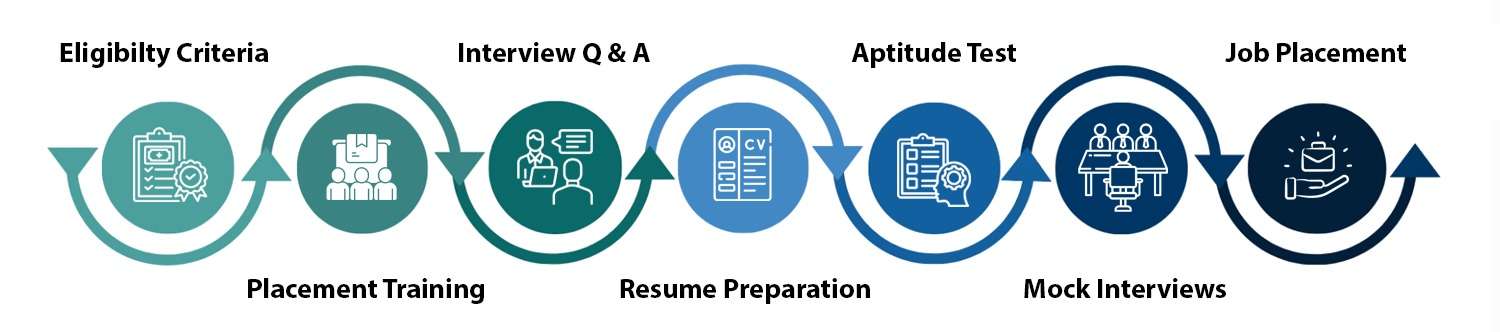
    Our Process

    our process

    Introduction to Graphic Design

    Graphic design is a discipline that combines art and technology to communicate ideas and messages through visual content. In today’s digital world, it serves as an essential tool for branding, marketing, and information dissemination across multiple platforms. As businesses and organizations increasingly shift their focus towards digital communication, the demand for skilled graphic designers has grown significantly. These professionals possess the ability to create compelling visuals that capture attention, convey messages effectively, and enhance user experience.

    With the rise of social media, e-commerce, and digital marketing, graphic design has become an integral component of business strategy. Organizations are continuously seeking talented designers who can translate complex concepts into visual formats, thereby reaching their target audience more effectively. This growing need for visual communication underscores the significance of undertaking a graphic design course in Noida, where aspiring designers can hone their skills and adapt to industry needs.

    AppWars Technologies stands as a leading provider of graphic design education in Noida, offering comprehensive courses that integrate theoretical knowledge with practical application. With a focus on modern design principles and software, AppWars Technologies equips its students with the tools necessary to thrive in a competitive job market. The graphic design training in Noida that they offer emphasizes the importance of creativity, innovation, and technical proficiency, ensuring that graduates are well-prepared to meet the evolving demands of various industries.

    Furthermore, the graphic design institute in Noida has gained a reputation for excellence, attracting individuals who aspire to make a mark in the design world. By enrolling in programs at AppWars Technologies, students have the opportunity to learn from experienced professionals, engage in hands-on projects, and build a portfolio that showcases their unique creative capacities. Enrolling in the right graphic design course can therefore be a significant step towards a successful career.

    When considering a graphic design course in Noida, AppWars Technologies stands out due to its commitment to providing comprehensive education tailored for aspiring designers. The institute’s curriculum is meticulously designed to cover a wide range of topics essential for mastering graphic design. With an emphasis on both theory and practical application, students engage with up-to-date industry practices, ensuring they are well-prepared for the evolving demands of the field.

    One of the standout features of AppWars Technologies is its experienced faculty. The instructors are industry professionals with extensive backgrounds in graphic design, offering not only academic knowledge but also invaluable insights from their real-world experiences. This unique combination enables students to learn from mentors who understand the intricacies of the graphic design landscape. The faculty members are dedicated to fostering a supportive learning environment, encouraging creativity while providing constructive feedback that enhances the students’ skills.

    Hands-on training is another critical aspect of the graphic design training in Noida provided by AppWars Technologies. Students have the opportunity to work on live projects, simulating real-life scenarios that they might encounter in their careers. This experiential learning approach not only enhances the students’ portfolios but also boosts their confidence as they navigate different design challenges. Moreover, the institute regularly updates its curriculum to include the latest software tools and design trends, ensuring that students acquire the most relevant skills needed in the job market.

    In conclusion, AppWars Technologies is not just an ordinary graphic design institute in Noida; it is a platform where creativity meets practical knowledge. By choosing this institution, students significantly enhance their chances of success in the competitive world of graphic design.

    The graphic design course offered by AppWars Technologies is meticulously structured to provide a comprehensive learning experience, tailored to accommodate individuals at varying skill levels. The course spans several months, featuring a blend of theoretical knowledge and practical application. It encompasses essential subjects such as typography, color theory, layout design, digital illustration, and extensive software training.

    Typography serves as a fundamental aspect within graphic design, teaching students how to choose and manipulate fonts effectively to communicate messages visually. In conjunction with typography, color theory helps learners understand the psychological effects of colors and their application in design. Layout design is another critical component, focusing on the arrangement of images and text, which facilitates clear communication and enhances visual appeal.

    A significant portion of the course emphasizes digital illustration techniques, allowing students to explore their creativity and develop unique styles. Moreover, proficiency in industry-standard software is vital for any aspiring graphic designer. Therefore, AppWars Technologies ensures that participants gain hands-on experience with key software tools such as Adobe Photoshop, Illustrator, and InDesign. The training in these applications equips students with the skills required to execute their design concepts efficiently.

    The graphic design training in Noida at AppWars Technologies is structured to guide students from introductory to advanced levels, ensuring that they build a robust understanding of design principles. Each module is carefully curated to enhance the learning experience while encouraging creativity and critical thinking. Overall, the curriculum is designed not just to educate but also to prepare students for the dynamic field of graphic design, instilling the necessary skills that will enable them to excel in their careers.

    The graphic design course in Noida offered by AppWars Technologies employs a multifaceted learning methodology aimed at fostering both creativity and technical skills. Central to this approach is project-based learning, which encourages students to engage with real-world design challenges. This method allows learners to actively apply theoretical concepts to practical projects, ensuring that they gain valuable hands-on experience.

    Collaborative projects form another cornerstone of the curriculum. Students are often grouped to work on various design initiatives, promoting teamwork and communication skills. This collaboration mirrors industry practices where designers frequently work in teams, thus preparing students for the dynamics they will encounter in the professional arena. Such interactions not only build camaraderie among peers but also expose participants to diverse perspectives and ideas, enriching their overall learning experience.

    Instructors at the graphic design institute in Noida play a vital role in guiding learners through this journey. They provide real-time feedback on projects, which is crucial for the development of design skills. This iterative process of receiving constructive criticism helps students refine their techniques and develop a discerning eye for detail. Moreover, feedback sessions foster an environment of continuous improvement, enabling learners to broaden their understanding of design principles and applications.

    Additionally, the emphasis on portfolio development is integral to the graphic design training in Noida. Throughout the course, students compile a diverse body of work that showcases their skills and creativity. This portfolio becomes a vital tool for job applications and interviews, allowing students to present tangible evidence of their abilities to potential employers. By integrating practical experience, collaborative efforts, and instructor guidance, the graphic design course at AppWars Technologies ensures that graduates are well-equipped to thrive in the competitive field of graphic design.

    Upon completing a graphic design course in Noida, graduates are presented with a plethora of career opportunities that can align with their creative ambitions. One of the primary roles available is that of a graphic designer, where individuals are tasked with creating visual content for print and digital media. This encompasses a range of materials, such as advertisements, brochures, and website graphics, allowing graduates to utilize their artistic skills in diverse contexts.

    In addition to traditional graphic design roles, the demand for UI/UX designers is steadily rising. These professionals focus on improving user interaction and experience with digital products, making their role essential in today’s technology-driven market. With AppWars Technologies’ emphasis on practical training, graduates are well-equipped to excel in this field, potentially securing positions with tech startups or established firms.

    Another exciting career path available is that of a digital illustrator. This role allows designers to bring imaginative concepts to life, often for use in books, games, or promotional materials. The evolution of digital platforms has significantly increased the demand for skilled illustrators who can create compelling visual narratives.

    A career as a branding specialist is also an attractive option, where professionals work on developing and maintaining a brand’s presence and identity. With the rise of social media and online marketing, companies are increasingly seeking experts who can craft resonant brand narratives and visuals. This specialization is well within the reach of graduates who have pursued comprehensive graphic design training in Noida.

    Regarding job markets, Noida’s thriving tech ecosystem offers numerous opportunities, particularly in sectors like IT, advertising, and media. Salary expectations can vary, but those entering the field can anticipate competitive remuneration, which typically improves with experience. Growth prospects are also promising, as digital and creative industries continue to expand both locally and nationally.
    Graphic Designing & Video Editing with AI Course Fees

    New Batch Starting
    6 Months Course Fees
    ₹48,000/-
    ₹41,300/-
    Flat ₹6,700 OFF
    • Graphic Designing with AI
    • Live offline & online Classes from Industry Expert
    • Hands-on curriculum with Real-Life Projects
    New Batch Starting
    7 Months Course Fees
    ₹55,000/-
    ₹48,000/-
    Flat ₹7,000 OFF
    • Graphic Designing & Video Editing with AI
    • Live offline & online Classes from Industry Expert
    • Hands-on curriculum with Real-Life Projects

    Got more questions?

    Talk to our team directly

    Contact us and our academic counsellor will get in touch with you shortly

    Student Testimonials

    Frequently Asked Questions

    1. What topics are covered in the Graphic Design training at Appwars Technologies?

    Our Graphic Design training covers essential tools and techniques, including Adobe Photoshop, Illustrator, CorelDRAW, InDesign, logo design, branding, typography, color theory, image editing, and real-world project work. We also provide training in UI/UX basics and portfolio development.

    2. Who can join the Graphic Design course at Appwars Technologies?

    Anyone interested in creative design can join—students, working professionals, entrepreneurs, or career switchers. No prior experience is required; we start from the basics and advance to professional-level concepts.

    3. What is the duration of the Graphic Design course in Noida?

    The duration typically ranges from 6 months, depending on the chosen training mode (regular, weekend, or fast-track). We also offer flexible batch timings for students and working professionals.

    4. Will I get a certificate after completing the Graphic Design training?

    Yes, upon successful completion of the course, students receive a recognized certification from Appwars Technologies, which is valuable for job applications and freelancing opportunities.

    5. Does Appwars Technologies offer placement assistance for Graphic Design students?

    Absolutely. We provide 100% placement assistance, including resume building, interview preparation, and direct referrals to hiring companies and design studios in Noida and NCR.

    Related Courses

    mern full stack

    MERN Full Stack

    powe bi

    Power BI

    web design

    Web Designing

    digital marketing

    Digital Marketing

    excel

    Advance Excel

    5/5 - (1253 votes)
    popup-form-image


      Get Free Career Counseling

      Talk to our experts and choose the right course and career path for your future.