
Build a successful career in accounting with practical, job-ready skills through Tally training in Noida at AppWars Technologies. Learn Tally Prime, GST, TDS/TCS, payroll, inventory management, and real-world accounting through hands-on projects.
Designed for beginners, graduates, professionals, and job-seekers, our Tally course in Noida provides expert training, certification, and placement assistance to help you become job-ready for accounting and finance roles.











1.1. Introduction
1.2. Accounting Principles, Concepts and Conventions
1.3. Double Entry System of Bookkeeping.
1.4. Types of Accounts – Real Accounts, Personal Accounts, Nominal Accounts
1.5. Rules of Accounting
1.6. Mode of Accounting
1.7. Financial Statements – Trading Account, Profit & Loss Account & Balance Sheet
1.8. Transactions – Recording Transactions
2.1. Introduction – Salient Features of Tally.ERP 9, Technological Advantages.
2.2. Getting Functional with Tally.ERP 9 – Tally.ERP 9 Start up, Mouse / Keyboard Conventions,
Switching between Screen Areas, Quitting Tally .ERP 9
2.3. Setting up of Company in Tally.ERP 9 – Create a Company, Select a Company, Alter a Company,
Shut a Company
2.4. F11: Company Features – F1:Accounting Features, F2: Inventory Features, F3: Statutory &
Taxation, F4:Tally.NET Features, F6: Add-On Features
2.5. F12: Configurations – General Configuration, Numeric Symbols, Accts/Inventory Info.
Configuration, Voucher Entry Configuration, Invoice /Orders Entry Configuration, Payroll
Configuration, Banking Configuration, Printing Configuration, EMailing Configuration, Data
Configuration, TDL Configuration, Advanced Configuration, Licensing Configuration
2.6. Practice Exercises
3.1 Chart of Accounts – Pre-defined Groups of Accounts.
3.2 Groups – Creating Single Group, Creating Multiple Groups, Displaying Group, Altering Group.
3.3 Ledgers – Creating Single Ledger, Creating Multiple Ledgers, Displaying Ledger, Altering Ledger.
3.4 Walkthrough for creating Chart of Accounts
3.5 Practice Exercises
4.1 Stock Groups – Creating Single Stock Group, Creating Multiple Stock Groups, Displaying Stock
Groups, Altering Stock Groups
4.2 Stock Categories – Creating Single stock Category, Creating Multiple Stock Categories, Displaying
Stock Category, Altering Stock Category
4.3 Units of Measure – Simple Units, Compound Units, Creating Simple Units, Creating Compound
Units, Displaying Units of Measure, Deleting Units of Measure
4.4 Godowns – Creating Single Godown, Creating Multiple Godowns, Displaying Godowns, Altering
Godowns
4.5 Stock Items – Creating Single Stock Item, Creating Multiple Stock Items, Displaying Stock items,
Altering Stock items
4.6 Voucher Types – Predefined Vouchers in Tally.ERP 9, Creating Voucher Type, Displaying Voucher
Type, Altering Voucher Types
4.7 Walkthrough for creating Inventory Masters
4.8 Practice Exercises
5.1 Accounting Vouchers – Contra Voucher(F4), Payment Voucher(F5), Receipt Voucher (F6), Journal
Voucher(F7), Purchase Voucher (F9), Sales Voucher (F8), Credit Note Voucher(Ctrl+F8), Debit Note
Voucher (Ctrl+F9), Reversing Journal Voucher (F10), Memo Voucher (Ctrl+F10), Optional Vouchers,
Post –Dated Vouchers
5.2 Walkthrough for recording Accounting Vouchers
5.3 Inventory Vouchers – Purchase Order, Sales Order, Rejections Out, Rejection In, Stock Journal,
Delivery Note, Receipt Note, Physical Stock Voucher
5.4 Walkthrough for recording Inventory Vouchers
5.5 Invoicing
5.6 Practice Exercises
6.1 Financial Statements – Balance sheet, Profit & Loss A/c, Trial Balance
6.2 Accounting Books & Reports – Cash Book, Bank Book, Purchase Register, Sales Register, Journal
Register, Debit Note Register, Credit Note Register, Day Book, Statistics Learning Tally.ERP 9 – From
Accounting to ERP Syllabus Page 3
6.3 Inventory Books & Reports – Stock Summary, Stock Item Summary, Stock Group Summary, Stock
Transfer Register, Movement analysis, Physical Stock Register
6.4 Exception Reports – Negative Stock , Negative Ledgers
6.5 Practice Exercises
7.1 Configuring Tally.ERP 9 for Multilingual Capabilities – Creating a company, Defining User Interface
Language, Enabling Multilingual Support
7.2 Creating Masters – Using Phonetic Keyboard Layouts, Creating Stock Item, Creating ledgers
7.3 Entering Transactions – Creating Purchase Invoice, Creating Sales Invoice, Printing Sales Invoice
7.4 Transliterations
7.5 Generating Reports – Display Stock Summary, Display Profit & Loss Account, Printing
Confirmation Letter in Multiple Languages
8.1 Tally Vault – Using Tally Vault Feature
8.2 Security Controls – Activate Security Control, Create Security levels,
Users and Passwords, Altering and Displaying a User/Type of Security, Loading Company with a
Username
8.3 Tally. Audit – Using Tally Audit Feature
8.4 Backup and Restore – Backup , Auto Backup, Restore
8.5 Split Company Data
8.6 Export and Import of Data – Export of Data, Exporting of Data for Re- Import into another company,
Import of Data, Export to Excel
8.7 ODBC Connectivity
8.8 Web Enabled, Print Preview and Online Help – Web Enabled, Internet Publishing, Upload, Mass
Mailing, Print Preview, Local / Online Help.
8.9 Printing Reports – Display & Print, Multi – Account Printing, Type of Print Configuration, Print
Format
9.1 Bill –wise Details – Activating Bill-wise Details, New Reference, View Outstanding Statement,
Against Reference, View Outstanding statement, View Ledger Outstanding Report, View Age-wise
Outstanding Statement, Payment Performance of Debtors, Advance, On Account, Bill-wise Details for
Non-trading Accounts, Practice Exercises
9.2 Cost Centers and Cost Categories – Activating Cost Category and Cost
Centre, Creating Cost Categories, Creating Cost Centres, Applying Cost Centers to Ledger accounts,
View Cost Centre Reports
9.3 Voucher Classes – Creating a Voucher Class, Invoice Entry using Voucher Class, Payment Entry
using Voucher Class, Stock Journal using Voucher Class
9.4 Cost Centre Class – Practice Exercises
9.5 Multiple Currencies – Creating Foreign Currencies, Altering Currencies, Deleting Currencies,
Voucher Entry using Foreign Currency, Displaying Forex Gain/Loss, Adjusting Forex Gain/Loss,
Practice Exercises
9.6 Interest Calculations – Interest Calculation in Simple Mode, Calculating Interest in Advanced Mode,
Practice Exercises
9.7 Budget & Controls – Activating Budgets, Creating a Budget, Displaying Budgets and Variances,
Altering a Budget, Deleting a Budget, Practice Exercises
9.8 Scenario Management – Reversing Journals, Memorandum Vouchers, Optional Vouchers, Activating
Scenarios, Creating a Scenario, Altering a Scenario, Deleting a Scenario
9.9 Banking – Multiple Instrument Support & Tracking, Cheque Printing, Single/Multi Cheque Printing,
Bank Reconciliation Statement, Deposit Slip, Payment Advice
9.10 Stock Summary as on March 2012, Trial Balance for March 2012, Practice Exercises
10.1 Order Processing – Purchase Order Processing, Altering a Purchase Order, Sales Order processing,
Altering a Sales Order, Display Order Position, Display Columnar Orders & Stock Details, Adjusting
Orders
10.2 Reorder Levels – Defining Recorder Levels, Display Recorder Status, Practice Exercises
10.3 Tracking Numbers – Using Tracking Numbers, Display Purchase Bills Pending
10.4 Batch –wise Details – Activating Batch-wise Details, Using Batch-wise Details in Purchase Invoice,
Using Batch-wise Details in Sales Invoice Learning Tally.ERP 9 – From Accounting to ERP
10.5 Additional Cost Details – Activating Additional Cost Details, Creating Purchase Voucher with
Additional Cost Details, Creating Purchase Invoice with Additional Cost Details, Appropriate
Additional Costs, Additional Costs incurred after Purchase, Practice Exercises
10.6 Bill of Materials (BOM) – Creating Bill of Materials, Creating a Manufacturing Journal, Using Bill
of Materials, Practice Exercises
10.7 Price Levels and Price Lists – Activating Price Lists and Defining Price Levels, Using Price Lists
10.8 Stock Valuation – Stock Valuation Methods, Display Stock Summary
10.9 Zero Valued Entries – Creating Zero Valued Entries
10.10 Inventory Ageing Analysis -View Inventory Ageing Report
10.11 Different Actual and Billed Quantities – Using Different Actual and Billed Quantities
11.1 Configuring Job Costing in Tally.ERP 9 – Company Setup, Enabling Job Costing in Tally.ERP 9
11.2 Creating Masters for Job Costing – Creating Jobs as Job Cost Centres, Creating Ledgers, Creating
Godowns dedicated to jobs, Creating Units of Measure, Creating Stock Items, Creating Voucher Type
with Voucher Class
11.3 Recording Transactions – Creating Receipt Note, Creating Purchase Invoice, Creating Transfer
Journal, Creating Consumption Journal, Creating Payment Voucher, Creating Sales Invoice, Creating
Stock Journal of Return of Materials
11.4 Job Costing Reports – Job Work Analysis Report, Material Consumption Summary, Godown
Summary, Comparative Job Work Analysis
12.1 Features of Job Order Processing in Tally.ERP 9
12.2 Configuring Job Order Processing Tally.ERP 9 – Company Setup, Enabling Job Order Processing,
Voucher Type Setup
12.3 Job Order Processing – Job Work Out Order, Job Work In Order
12.4 Job Order Reports – Job Work Out Reports, Job Work In Reports
13.1 Overview of Tally.NET, Configure Tally.NET Features, Connect Company on Tally.NET, Create
Remote Users, Authorise Remote Users, Remote Access, Login as Remote User
14.1 Concept of Control Centre – Features of Control Centre, Advantages of Control Centre
14.2 Installing & Activating Tally.ERP 9 – Installing Tally.ERP 9, Activating Tally.ERP 9 License,
Launch Tally.ERP 9
14.3 Logging to Control Centre
14.4 Managing Accounts using Control Centre – Licensing & Configuration, User Management, Jobs &
Recruitment, Assessment, Account Profit Management, Change Account Admin
15.1 Features of Support Centre
15.2 Accessing the Support Centre – Local Access, Remote Access.
15.3 Using Support Centre – Adding a New Issue/Query, Replying to an Issue/Query, Close an
Issue/Query, Other Functions.
16.1 Basic Concepts in VAT
16.2 Configuring VAT in Tally.ERP 9 – Company Setup, Enabling Value Added in Tax (VAT), VAT
Classifications
16.3 Creating Masters – Creating Purchase Ledger, Creating Sales Ledger, Creating Input VAT Ledger,
Creating Party Ledgers, Creating Stock Items
16.4 Entering Transaction – Creating Purchase Voucher without Inventory, Creating Purchase Invoice
with default VAT Class, Creating Purchase Invoice with Selection of VAT Class during Entry, Creating
Purchase Invoice with Multiple VAT Rates, Creating Sales Voucher without Inventory, Creating Sales
Invoice with default VAT Class, Printing Sales Invoice, Creating Sales Invoice with Selection of VAT
Class during Entry, Creating Sales Invoice with Multiple VAT Rates, Creating Sales Invoice using
Voucher Class
16.5 Accounting for Return of Goods – Sales Returns, Purchase Returns
16.6 Rate Difference in Purchase/Sales – Rate difference in Purchase, Rate difference in Sales
16.7 Accounting for Interstate Transactions – Inter –state Purchases, Inter –
state Sales
16.8 Exempt Transaction under VAT – Exempted Purchase, Exempted Sales
16.9 Purchases from Unregistered Dealers Learning Tally.ERP 9 – From Accounting to ERP Syllabus
Page 5
16.10 Claiming ITC on Capital Goods
16.11 Inter –state Branch Transfers – Branch Transfer Outwards, Adjustment of ITC on Branch
Transfers, Branch Transfer Inwards
16.12 VAT Reports – Vat Computation, VAT Returns, eVAT Returns, VAT Commodity, VAT Register
16.13 Practice Exercises
16.14 VAT for Composite Dealers – Enabling VAT for Composite Dealer, Composite VAT
Classifications, Creating Masters, Creating Purchases, Creating Sales, Purchase from Unregistered
Dealers, VAT Composition Reports, Payment of Composite VAT, Practice Exercises.
17.1 Basics of Central Sales Tax (CST)
17.2 Enabling CST In Tally .ERP 9 – Company Setup, Creating Masters
17.3 Recording interstate Transactions in Tally.ERP 9 – Inter-state Purchases, Inter-state Sales Against C
Forms, Transit Sales against E1 and E2 Forms, Branch Transfers/Consignment Sales against F Forms,
Exports against H Form, Sales to SEZ Units against I Form
17.4 Payment of CST
17.5 CST Reports – Forms Receivable Report, Forms Issuable Report, ECST Forms, CST Register
17.6 Practice Exercises
18.1 Basic Concepts of TDS
18.2 Configuring TDS in Tally.ERP 9 – Enabling TDS in Tally.ERP 9, TDS Statutory Masters
18.3 Creating Masters – Expenses Ledger Accounts, TDS Ledger Accounts, Party Ledger Accounts,
Bank Accounts
18.4 Recording Transactions – Booking Expenses and Deducting TDS, Booking Expenses and
Deducting TDS Later, TDS Deduction at Lower Rate, TDS Deduction at Zero Rate, Deducting TDS on
Payments, Payments of TDS
18.5 TDS Reports – Computation, Challan Reconciliation, Return, eTDS Returns, Outstandings,
Exception Reports
19.1 Basics of Service Tax
19.2 Configuring Tally.ERP 9 for Service Tax – Salient Features of Service Tax compliant Tally.ERP 9,
Company Setup, Enabling Service Tax, Service Tax Statutory Masters
19.3 Creating Masters – Creating Sundry Creditors Ledger, Creating Sundry Debtors Ledger, Creating
Duties and Taxes Ledgers, Creating Sales Ledger for Services, Creating Purchase Ledger for Services,
Creating Bank Ledger
19.4 Recording Transactions – Creating Purchase Invoice, Creating Sales invoice
19.5 Accounting for Advance Receipts
19.6 Accounting for Opening Service Tax Credit
19.7 Adjustment of Input Service Tax Credit
19.8 Payment of Service Tax
19.9 Service Tax Reports – Service Tax Computation, Service Tax Payables, Input Credit Summary, ST
3 Report, Exception Reports.

Build practical accounting skills with Tally training in Noida at Appwars Technologies. Our training focuses on real accounting work instead of only theoretical concepts. You can learn Tally Prime, GST, TDS/TCS, payroll, inventory management, banking and day-to-day accounting processes through practical exercises and projects.
Whether you are a beginner, commerce graduate, job seeker or working professional, our Tally course in Noida helps you develop the skills required for accounting and finance roles.
Appwars Technologies focuses on making learners job-ready through practical Tally training. Our trainers explain accounting concepts step-by-step and provide hands-on practice with Tally software.
You get practical exposure to GST, invoicing, ledger management, taxation, payroll and inventory operations, along with guidance for applying these skills in real workplace situations.
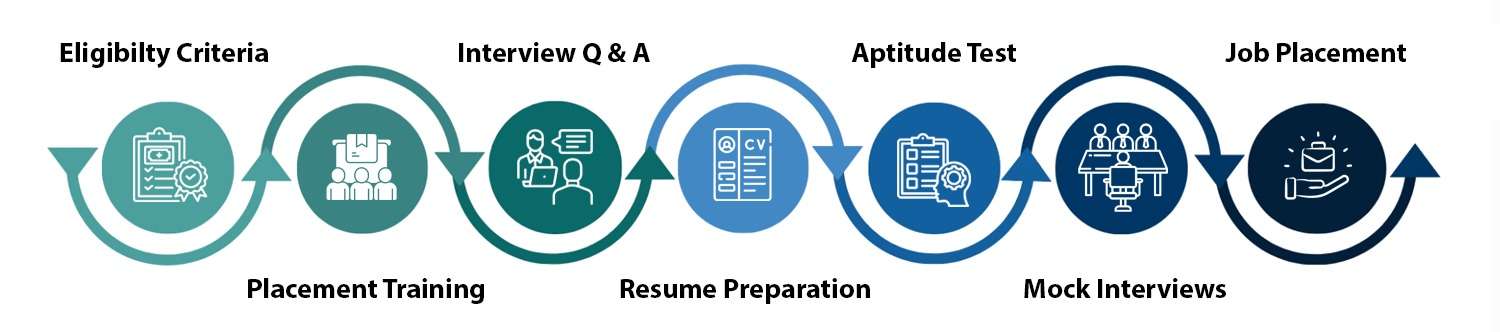
Completing a course is only the first step toward building your career. Our Tally training in Noida with placement assistance is designed to support you beyond classroom learning.
We help eligible candidates with resume preparation, interview preparation, mock interviews and job opportunities through our hiring network. Our goal is to help you confidently apply for accounting and finance positions.
Our Tally classes in Noida are designed around practical learning and workplace requirements. Key benefits include:
Tally remains widely used by businesses for accounting, taxation, invoicing, payroll and financial record management. Companies across industries require professionals who can maintain accounts accurately and work efficiently with accounting software.
After completing a Tally certification course in Noida, you can explore opportunities in accounting firms, businesses, CA offices, finance departments, retail companies and other organizations that use Tally for daily financial operations.
1. Fill the application form Share your basic details and course interest so our counselling team can prepare a session tailored to your background.
2. Get personalized counselling Talk through your career goals, current experience, and which Tally module fits your direction with one of our academic counsellors.
3. Join the program Get trained by industry experts on a curriculum customized to your learning pace and career target.
Appwars Technologies stays involved after your last class. Placement support includes resume formatting aligned to how recruiters screen Tally profiles, structured mock interviews with feedback, and direct connections to our hiring partners actively recruiting for functional and technical Tally openings across Noida and Delhi NCR.
Batches run in both regular (weekday) and weekend formats to fit working professionals and full-time students differently. Exact duration depends on which Tally module track you choose. Check current batch dates and timing here: upcoming batch schedule.
Got more questions?
Contact us and our academic counsellor will get in touch with you shortly
EXCELLENT Based on 1354 reviews
 Posted on Google
 Vijay Bhandari
Trustindex verifies that the original source of the review is Google.
Writing this for " Amit Yadav Sir ": The webinar held on 25-10-2026 on RAG Technology was an excellent learning experience. Sir explained every concept clearly and in detail, demonstrating strong subject knowledge and excellent teaching skills. What impressed me most was his patience and genuine concern for students, as he actively encouraged questions and took the time to resolve our doubts. His dedication and student-friendly approach truly deserve appreciation and recognition. I hope the company acknowledges his efforts for his outstanding contribution. Keep up the great work!Posted on Google atharva rai
Trustindex verifies that the original source of the review is Google.
I recently completed a comprehensive training session conducted by Ankit Yadav at AppWars Technologies, focusing on Retrieval-Augmented Generation (RAG) and its integration with Generative AI. The session was exceptionally well-structured, bridging the gap between foundational theory and practical implementation. Ankit is a brilliant instructor who brings immense industry expertise to the table. He has a unique ability to break down complex architectural concepts into highly digestible modules, making it accessible for both beginners and seasoned developers.Posted on Google AartiGood experiencePosted on Google
 AnkushVery good presentation by sir, he taught us very important knowledge for future. I am greatfull to attend the workshop. AT DPosted on Google
 vansh KrA great Workshop on RAG by Ankit sir , very beginner friendly language and good interactionPosted on Google
 Muskan MalikGreat Experience, we learn alot about Gen AI in Ambedkar institute of technology, Especially thanks to sir for teaching politely and very efficiently.Posted on Google
 Aditya SharmaVery Good experience and explainatiomVerified by TrustindexTrustindex verified that these reviews were published on APPWARS Technologies Pvt. Ltd.'s Google Business Profile. Learn more

Talk to our experts and choose the right course and career path for your future.