So you typed “graphic designer roadmap” into Google at midnight, tired of scattered YouTube tutorials that jump from color theory basics straight to “how I made 50k designing logos. ” I get it.
Graphic design looks simple from the outside. Open Photoshop, drag some shapes, done. It’s not.
This graphic designer roadmap breaks down what to learn, in what order, and how long each stage actually takes if you’re serious about it. No “30 days to mastery” nonsense. Just the steps working designers in Noida, Delhi, and Mumbai actually followed to land a job or their first paying client.
I’ve watched hundreds of students at Appwars Technologies start from zero and go pro. Some came straight out of a B.Com degree with zero design background. Others were working professionals switching careers after 5 years in an unrelated job.
The graphic designer roadmap below worked for both groups, just at different speeds.
One thing before you start: this roadmap assumes you’re putting in real hours, not 20 minutes here and there between reels. If you treat it like a hobby, it’ll take twice as long. If you treat it like a part-time job, you can realistically hit job-ready in under a year.
Why a graphic designer roadmap matters in 2026
Graphic design in 2026 isn’t what it was in 2020. AI tools like Midjourney and Adobe Firefly now generate rough visuals in seconds. That scares some people out of the field.
It shouldn’t.
Clients still need designers who understand brand strategy, typography, and how to fix what AI gets wrong. The tools changed. The fundamentals didn’t.
A clear graphic designer roadmap saves you from the biggest trap in this field: learning software without learning design. I’ve seen students who can click every button in Photoshop but can’t explain why a logo actually works. That’s a wasted year, and it’s avoidable.
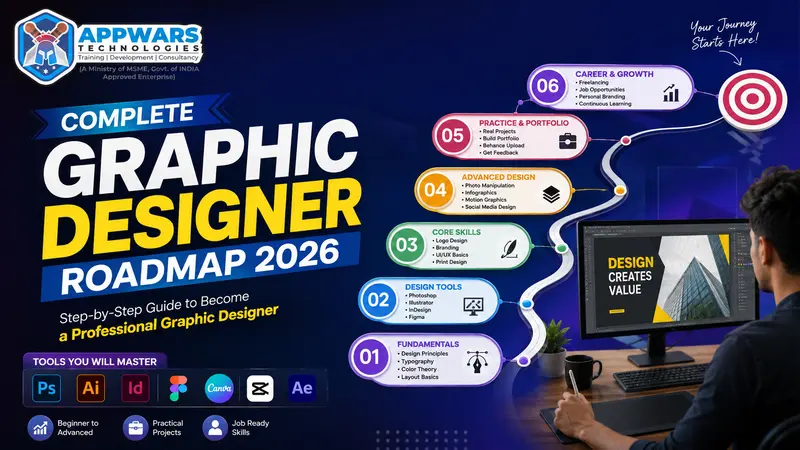
Get Free Career Counseling ➔Step 1: Learn the fundamentals before you touch any software.
Weeks 1 to 4. Skip this step and everything after it wobbles.
- Color theory: why blue feels trustworthy, red feels urgent, and how to build a palette that doesn’t fight itself
- Typography: pairing fonts, spacing, and knowing when a script font is genuinely the wrong choice (often)
- Layout and composition: grids, alignment, white space
- Visual hierarchy: guiding someone’s eye to what matters first
Spend 3 to 4 weeks here. Sketch on paper. Study 20 logos you like and figure out why they work.
This part feels slow, but it’s the foundation everything else in your graphic design roadmap sits on.
A simple daily habit that works: pick one object, poster, or app screen every day and redraw its layout on paper, just the boxes and text blocks, no detail. Do this for 20 days straight. You’ll start noticing hierarchy and spacing on your own, without a tutorial explaining it to you.
Step 2: Get fluent in the core design tools.
Months 2 to 4. Don’t try to learn every tool at once.
| Tool | What it’s for | Time to get comfortable. |
|---|---|---|
| Adobe Photoshop | Photo editing, image manipulation, social creatives | 3 to 4 weeks |
| Adobe Illustrator | Vector graphics, logos, icons | 4 to 5 weeks |
| Adobe InDesign | Brochures, magazines, multi-page layouts | 2 to 3 weeks |
| CorelDraw | Vector work, still common with print shops in India | 2 weeks |
| Canva | Fast social content, templates | A few days |
| Figma | UI/UX design, prototyping | 3 to 4 weeks |
Start with Photoshop and Illustrator. Together they cover most entry-level graphic design jobs in India. Add InDesign once you’re comfortable, then Figma if you’re eyeing UI/UX work.
What it actually costs to start
Money stops a lot of people before software even does. Here’s a realistic breakdown.
| Item | Free or low-cost option | Paid option |
|---|---|---|
| Design software | Canva free tier, GIMP, Photopea (browser-based) | Adobe Creative Cloud, roughly ₹1,675/month for the full suite |
| Laptop | Any 8GB RAM machine you already own | i5/Ryzen 5, 16GB RAM, dedicated graphics, ₹55,000 to 80,000 |
| Fonts and assets | Google Fonts, Unsplash, Pexels | Envato Elements subscription |
| Learning | YouTube, free Behance case study breakdowns | A structured graphic designer roadmap program with mentor feedback |
You genuinely don’t need the paid version of everything on day 1. Learn on Photopea or a trial version first. Upgrade once you’re earning from client work and the subscription pays for itself.
Step 3: Add UI/UX so you don’t get stuck making posters forever.
Months 4 to 5. Pure graphic design jobs, the kind where you only churn out banners and posters, tend to pay less and plateau fast. UI/UX knowledge changes that math.
You don’t need to become a full-time UX researcher. Learn:
- Basic wireframing
- User flows and screen states
- Figma or Adobe XD
- Mobile-first design principles
Among students I’ve watched go through this graphic designer roadmap, the ones who added UI/UX basics consistently moved into better-paying roles within 2 years. It’s a small addition to your skill set with a big payoff.
Get Free Demo Class ➔Step 4: Build 15 to 20 real portfolio pieces, not tutorial clones.
Months 5 to 7. Recruiters spot a tutorial project instantly. The same coffee shop logo. The same fake app screen everyone copies from a YouTube video.
Build for real problems instead:
- Rebrand a small local business (ask a shop owner; most say yes to free work)
- Design a full social media kit for a nonprofit
- Create packaging for a fictional product with a defined target audience
- Redesign an app screen you use daily and write up why you changed it
Aim for 15 to 20 solid pieces. Quality beats quantity here. 6 strong projects will beat 30 mediocre ones on a portfolio site every time.
Where to actually put this portfolio
- Behance: still the default for Indian agencies checking your work before a shortlist call
- Dribbble: better for UI/UX-leaning designers, smaller but higher-quality audience
- Instagram: useful for freelance clients who don’t think in “portfolio site” terms, they just scroll
- A personal site: not mandatory in year 1, but worth building once you have 10+ pieces worth showing
Pick 2 platforms and post consistently. Spreading across 5 platforms with a half-updated profile on each does more harm than good.
Step 5: Pick a specialization.
Month 8 onward. Generalists tend to earn less than specialists once you’re past year 2. Pick a lane.
| Specialization | What you’ll do | Who hires for it |
|---|---|---|
| Branding and logo design | Identity systems, style guides | Agencies, startups |
| UI/UX design | App and web interfaces | Tech companies, product teams |
| Motion graphics | Animated ads, explainer videos | Marketing agencies, YouTube channels |
| Packaging design | Product boxes, labels | FMCG brands, D2C startups |
| Social media design | Reels covers, ad creatives, carousels | Digital marketing agencies |
You can always switch later. Picking one now gives your portfolio a focus instead of 10 scattered skills nobody can place you against.
Step 6: Land your first client or job
Month 9 onward. Your first paid project rarely comes from a job board. It usually comes from:
- Cold emailing 20 local businesses with a free mockup attached
- Posting consistently on Behance and Instagram
- Taking a smaller-than-ideal freelance gig on Fiverr just to build reviews
- Using placement support if you’re studying at a structured program, where direct referrals to hiring companies in Noida and NCR are part of the deal
Don’t wait for the perfect first client. Take the ₹2,000 logo project. It builds momentum and testimonials faster than holding out for a dream brief.
Graphic designer roadmap: month by month plan
| Timeline | Focus | Milestone |
|---|---|---|
| Month 1 | Design fundamentals | Can explain color theory and hierarchy out loud |
| Month 2-3 | Photoshop and Illustrator | 5 practice pieces done |
| Month 4 | InDesign and basic UI/UX | The first multi-page layout was finished. |
| Month 5-7 | Portfolio building | 15+ real projects live |
| Month 8 | Specialization | 1 focus area chosen |
| Month 9-10 | Client outreach | The first 3 paid projects closed. |
| Month 11-12 | Job or freelance scaling | First job offer or ₹20,000+/month freelance income |
Your timeline might stretch longer if you’re studying part-time alongside college or a job. That’s normal. The order matters more than the speed.
Explore Trending Courses ➔Graphic design career path: where the roles actually lead
A graphic design career path isn’t a straight ladder. It branches.
- Junior graphic designer → Senior designer → Art director → Creative director
- Junior designer → UI/UX designer → Product designer → Design lead
- Freelancer → Studio owner → Agency founder
- In-house designer → Brand manager → Marketing lead
Most people can’t tell you which branch they’ll take in month 1, and that’s fine. Pick a direction after your first year of real client or job experience, once you actually know what you enjoy doing at 6 pm on a Tuesday.
What matters more than the branch is the switch cost. Moving from graphic design into UI/UX is a relatively small jump, maybe 2 to 3 months of focused learning, because the visual foundations carry over directly. Moving from graphic design into something like 3D animation is a much bigger jump. Keep that in mind when you’re mapping your own graphic design career path so you’re not surprised by how long a pivot actually takes.
Graphic designer salary in India (2026)
Numbers vary a lot by city, skill, and specialization, but here’s a general range for 2026.
| Experience level | Typical annual salary |
|---|---|
| Fresher (0-1 year) | ₹2.5 to 4.5 LPA |
| Mid-level (2-5 years) | ₹6 to 12 LPA |
| Senior (5+ years) or specialized (UI/UX, branding) | ₹15 to 25 LPA |
| Freelance, steady client base | ₹6 to 15 LPA equivalent |
Metro cities like Bangalore, Mumbai, and Delhi NCR pay more because of the concentration of tech companies and agencies. Noida specifically has a growing base of design and IT firms, which is part of why local placement support and internships matter so much here.
Certifications that actually help
Certifications won’t get you hired on their own. Your portfolio does that. But they help with ATS filters and first-time client trust.
- Adobe Certified Professional (Photoshop or Illustrator)
- Google UX Design Certificate, if you’re leaning toward UI/UX
- A recognized institute certification from a structured graphic designer roadmap program, which adds credibility when you’re applying with zero work history yet
Mistakes that slow down your graphic designer roadmap
- Jumping straight into Illustrator without learning why designs work in the first place
- Watching 50 YouTube tutorials instead of finishing 5 real projects
- Copying templates and calling it a portfolio piece
- Undercharging so much that clients start assuming the work is low quality
- Never asking for feedback because criticism stings
- Chasing every new AI tool instead of finishing the project in front of you
- Working in isolation for months without showing anyone your progress
Every one of these adds 2 to 3 months to your timeline. Skip them and you’ll move through this graphic design roadmap faster than most people around you.
I’ve watched two students start the exact same week. One avoided these mistakes and had a paying client by month 6. The other made most of the list above and was still tweaking a portfolio nobody had seen by month 10.
FAQs
How long does it take to become a job-ready graphic designer?
Realistically, 8 to 12 months if you’re consistent. Faster with structured guidance, slower if you’re self-teaching and constantly second-guessing your direction.
Do I need a design degree?
No. A strong portfolio outweighs a degree for most Noida-based agencies and Indian startups. Skills get you hired, not transcripts.
Which software should I learn first?
Photoshop, then Illustrator. Together they cover most entry-level tasks on any graphic designer roadmap.
Is graphic design still a good career in 2026, with AI tools around?
Yes, if you specialize. AI handles rough drafts fast. Humans still handle strategy, brand fit, and the judgment calls clients actually pay for.
Can I follow a graphic designer roadmap while working a full-time job?
Yes, plenty of people do. Expect the timeline to stretch to 14 to 18 months instead of 8 to 12, since you’re working with evenings and weekends instead of full days.
Should I learn on my own or join a structured course?
Either works. Self-teaching is cheaper but slower, and it’s easy to get stuck without feedback on your work. A structured graphic designer roadmap with a mentor and a batch of peers tends to compress the timeline and catches bad habits early.
Start today, even in a small way.
A graphic designer roadmap only works if you follow it end to end, not just the fun parts like picking fonts and skipping the fundamentals.
If you’d rather have structured mentorship than piece this together from scattered videos, the Graphic Designing course in Noida at Appwars Technologies walks through every step in this roadmap, from color theory to portfolio building to placement support.
Open a blank canvas today. Even 30 minutes of sketching moves you forward.